The Platform — DCT, TMP, and UIS
The developer platform is built from three projects that work together. Each has a clear job.
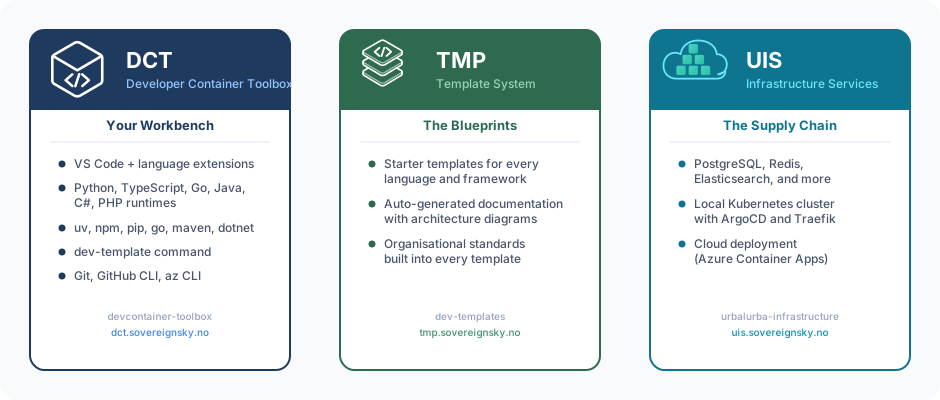
DCT — Your Workbench
Full name: Developer Container Toolbox
DCT is the developer's desk with every tool already in place. It provides a devcontainer — a pre-configured development environment that runs inside VS Code. No matter what operating system you use (macOS, Windows, Linux), every developer gets the same setup: same language runtimes, same package managers, same editor extensions.
What it provides:
- A devcontainer with all languages pre-installed (Python, TypeScript, Go, Java, C#, PHP)
- The
dev-templatecommand for installing and configuring templates - VS Code extensions for each language
- Git, GitHub CLI, and other development tools
Website: dct.sovereignsky.no — Repository: github.com/helpers-no/devcontainer-toolbox
TMP — The Blueprints
Full name: Template System
TMP is the recipe book. It contains all the starter templates and their documentation. When a developer wants to build an app, they start here — browsing templates, reading what each one provides, and picking the one that fits.
What it provides:
- Starter templates for different languages and frameworks
- Auto-generated documentation for every template
- Best practices baked into every template — code structure, security, CI/CD, documentation
Website: tmp.sovereignsky.no — Repository: github.com/helpers-no/dev-templates
UIS — The Supply Chain
Full name: Urbalurba Infrastructure Services
UIS is the supply chain. When a template needs a database, a cache, or any other infrastructure service, UIS knows how to set it up. It provisions services in the local Kubernetes cluster during development, and can do the same in cloud environments (like Azure) for production.
What it provides:
- A catalogue of infrastructure services (PostgreSQL, Redis, Elasticsearch, and more)
- Scripts to provision those services locally or in the cloud
- Port forwarding so the developer's app can reach services running in the cluster
- The local Kubernetes cluster setup (ArgoCD, Traefik ingress, namespaces)
- Deployment target provisioning for Azure Container Apps, AKS, Ubuntu K8s, and Raspberry Pi
Website: uis.sovereignsky.no — Repository: github.com/helpers-no/urbalurba-infrastructure
Available services: uis.sovereignsky.no/services
How they work together
The three projects form a chain. The developer interacts with DCT (through VS Code and the terminal). DCT reads from TMP (which template to install, what services it needs). DCT then calls UIS (to actually provision those services).
The developer never talks to UIS or TMP directly. Everything goes through DCT — two commands and the environment is ready.
Deployment targets
UIS can provision services and deploy applications into multiple environments. The developer selects a target, and UIS handles the rest.
The website/src/deployment-targets.json is not finished yet
| Target | Type | Description | Status |
|---|---|---|---|
| Rancher Desktop | development | Local Kubernetes cluster on the developer's laptop. ArgoCD watches the repo and deploys on every push. | ready |
| Azure Container Apps | cloud | Serverless containers on Azure. Managed PostgreSQL via Azure Database for PostgreSQL Flexible Server. | in-progress |
| Azure AKS | cloud | Managed Kubernetes on Azure. Full K8s cluster with ArgoCD or direct deployment via azure/k8s-deploy. | rewrite |
| Ubuntu K8s | on-prem / cloud | Kubernetes on Ubuntu — bare metal server, virtual machine, or cloud instance. UIS installs K8s and configures the cluster. | rewrite |
| Raspberry Pi | edge | Kubernetes on ARM hardware. UIS installs a lightweight K8s distribution on the Pi. | rewrite |
The same template works on any target. The developer writes code once; dev-template configure --target <name> provisions the right services in the right environment.
Why three projects instead of one?
Each project is maintained by the people closest to its concerns:
| Project | Maintained by | Concern |
|---|---|---|
| DCT | Developer experience team | "What tools does a developer need on their laptop?" |
| TMP | Template authors | "What starter code should we offer?" |
| UIS | Infrastructure team | "How do we provision and manage services?" |
A template author can add a new template without knowing how Kubernetes works. An infrastructure engineer can add a new service to UIS without knowing Python or React. A developer experience engineer can improve the devcontainer without touching templates or infrastructure. The boundaries keep things maintainable as the platform grows.